 Синькуань Сервер | Поставщик оборудования для корпоративных серверов
先选桌面模型,再算服务器:VDI 的三种架构路径
VDI 硬件规划的常见错误是从服务器规格倒推,而不是从桌面模型正推。桌面模型决定一切——会话密度、IOPS 曲线、存储类型、GPU 需求。2026 年主流是三条路径:
| Модель | Desktop behavior | Hardware impact |
|---|---|---|
| Persistent VDI | Each user owns a desktop VM | High storage footprint, full user-state, GPU useful for CAD/creative |
| Non-persistent VDI | Stateless desktop from golden image | Best density, boot-storm heavy, storage-light, reset on logoff |
| RDSH (shared sessions) | Many users share a session host | Highest density, cheapest per user, fewer GPU options |
Most enterprises run non-persistent VDI for general knowledge workers, persistent pools for power users, and RDSH for light task workers — a mix that maps to different server roles.
Per-VM Budgeting: The Numbers That Size the Fleet
| Тип пользователя | vCPU | Память | Storage IOPS (типичный) |
|---|---|---|---|
| Task worker (RDSH) | 0.5-1 | 2-4 ГБ | 10-15 |
| Knowledge worker | 1-2 | 4-8 ГБ | 20-30 |
| Power user / developer | 2-4 | 8-16 ГБ | 40-60 |
| CAD / creative | 4-8 | 16-32 ГБ | 60-100 + графический процессор |
A 2U dual-socket node with 64 ядра и 1 TB of DDR5 (32 x 32GB at 1DPC — see our DDR5 memory guide for the speed rules) typically lands at 40-60 knowledge-worker VMs, 80-120 RDSH sessions, или 20-30 power-user VMs. That spread is why sizing starts with the user profile, not the server.
The 2U VDI Node: R760 and 2288H V7
Two platforms cover the mainstream VDI sweet spot:
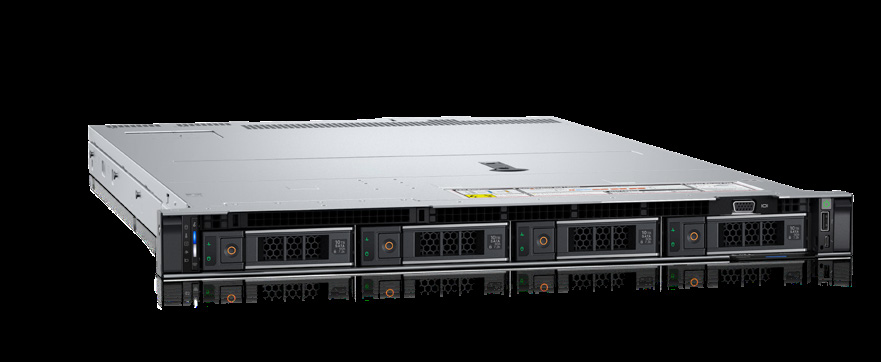
- Dell Poweredge R760 — 2U dual-socket (5поколение Xeon, 64 ядра), 32 DDR5 slots up to 5600 МТ/с, вплоть до 24 x NVMe U.2 or 16 x E3.S Gen5, 8 Слоты PCIe, и до 2 Икс 350 W GPUs for accelerated sessions. Dell lists VDI explicitly in its workload positioning.
- xFusion FusionServer 2288H V7 — 2U dual-socket (4th/5th Gen Xeon, 385 Вт TDP), 32 DDR5 at 5600 МТ/с (plus CXL expansion), вплоть до 28 твердотельные накопители NVMe, 14 х PCIe 5.0 slots and 4 x double-wide GPU support — the VDI/VDI-flash density play in the same form factor.
Both run the same iDRAC/iBMC out-of-band management model, so a mixed fleet keeps one operations discipline.
Storage Design: Winning the Boot Storm
VDI storage fails in the morning: hundreds of desktops boot simultaneously, hammering the storage layer with a burst of reads — the boot storm. The storage architecture that survives:
- NVMe for the desktop pool. 24 x U.2 NVMe on the R760 (или 28 x on the 2288H V7) absorbs boot-storm IOPS without cache tuning; SATA/SAS arrays rarely survive the burst at scale.
- Separate the layers. Golden image + user profiles on a small SSD tier; desktop VM disks on the NVMe pool; backups on a different tier entirely.
- RAID with cache. PERC H965i tri-mode (see our МИНУТА H965i) handles NVMe passthrough and SAS RAID with 8GB cache — sizing the cache to the boot-storm window cuts latency spikes.
- Stagger the boot. Schedule-based login staggering or replica caching in the hypervisor flattens the storm before you spend on storage.
Network and Protocol Bandwidth
VDI traffic is mostly low-bandwidth display protocol (Blast, PCoIP, RDP) with bursty profile writes. 10GbE per compute host is the practical minimum; 25GbE on the fabric removes network as a variable. The R760’s 8 PCIe slots carry dual 10/25GbE adapters plus GPU risers without contention; the 2288H V7’s 14 х PCIe 5.0 slots leave even more headroom for dense pools.
GPU Acceleration: When and How Much
Not every VDI pool needs GPUs. General knowledge workers run fine on CPU; CAD, creative and data-science users benefit from hardware acceleration. Plan two tiers:
- Accelerated pool: 2 Икс 350 W double-width GPUs on the R760 (или 4 x double-width on the 2288H V7) for CAD/creative users — 1 GPU per 10-20 accelerated sessions depending on workload.
- Standard pool: CPU-only nodes at maximum session density.
Mixed GPU/CPU pools in the same chassis family let you scale either tier without a second platform generation.
Rollout: POC to Production in Four Steps
- POC (2-4 weeks): one node, 20-50 representative users, capture real IOPS and session density — do not trust vendor math.
- Pilot (4-8 weeks): 200-500 users across two nodes, production networking and storage path, measure boot-storm behavior.
- Scale-out: replicate the validated node template; keep the golden image pipeline automated.
- Operate: monitor session density, IOPS latency and memory pressure; а 760 рэндов и 2288Х V7 both expose the telemetry (iDRAC/iBMC) that catches a degrading pool before users feel it.
FAQ
- Persistent or non-persistent? Non-persistent for general staff (плотность), persistent for power users (state), RDSH for task workers (cost).
- How many VMs per node? 40-60 knowledge workers on a 64-core/1TB 2U node — verify with your own POC.
- NVMe required? For pools above ~200 desktops, yes — boot storms overwhelm SAS arrays.
- графические процессоры? Only for CAD/creative pools; plan a separate accelerated tier.
- Where do I start? Profile the users first, then size memory, then storage, then network.
Planning a VDI refresh? We deliver POC-ready nodes on the PowerEdge R760 and FusionServer 2288H V7 with NVMe pools, PERC tri-mode RAID and GPU options — factory-direct pricing, 3-год гарантии, global shipping and free density consultation from our authorized partner team. Contact us for a VDI sizing review.

Deployment note: the same per-VM budgets apply on either vendor — R760 or 2288H V7 — the difference is slot count, NVMe density and GPU headroom, not the sizing math.